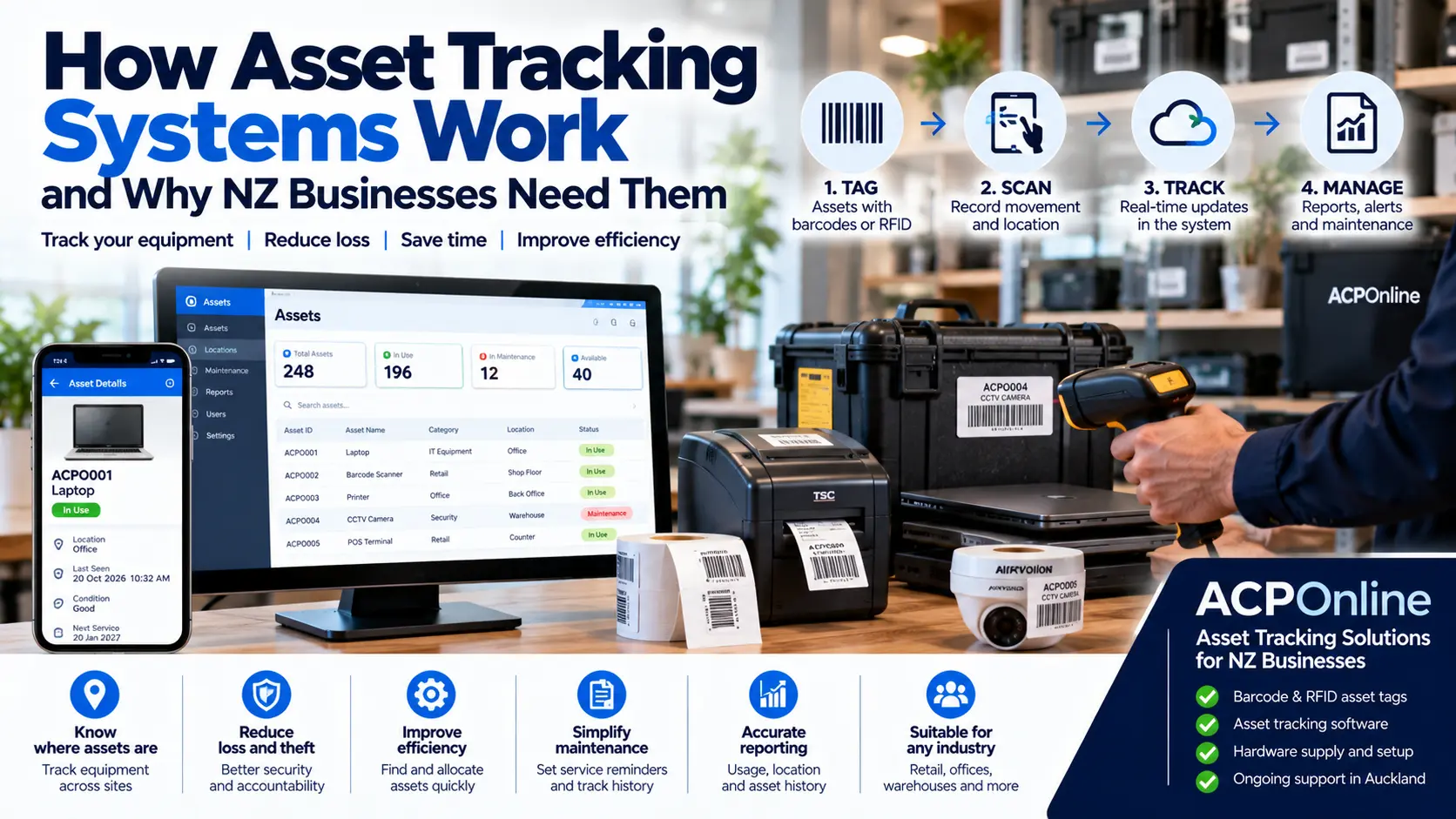
What Is an Asset Tracking System?
An asset tracking system helps businesses identify, record, locate and manage valuable equipment throughout its working life. From laptops and computers to tools, machinery, medical equipment and office furniture, asset tracking provides a structured way to know what your organisation owns, where it is located and who is responsible for it.
For businesses in Auckland and throughout New Zealand, asset tracking can reduce misplaced equipment, improve accountability and simplify audits.
ACP Online supplies business technology solutions, including barcode scanners, asset labelling equipment and Wasp asset tracking solutions. Visit ACP Online to discuss your requirements.
How Do Asset Tracking Systems Work?
Most asset tracking systems combine unique identification labels, data capture devices and asset management software. Each asset receives an identification number that links to its digital record.
Step 1: Register Each Asset
When equipment is purchased or introduced into the organisation, it is recorded in the asset management database. Typical details include:
- Unique asset ID and serial number.
- Equipment description, brand and model.
- Purchase date, purchase cost and supplier.
- Assigned employee or department.
- Current location and asset condition.
- Warranty information and maintenance history.
- Expected replacement or disposal date.
Step 2: Attach an Asset Identification Label
Each asset is assigned a barcode, QR code or RFID tag. Durable asset labels help staff identify equipment quickly and consistently. Label material should suit the environment, including exposure to moisture, cleaning chemicals, heat or abrasion.
Step 3: Scan the Asset
Staff use a compatible barcode scanner, mobile device or RFID reader to identify an asset. The system retrieves its record and allows authorised users to update relevant information.
Step 4: Record Asset Movements
When equipment moves between locations or employees, a user can record the transfer, check-out or check-in. The system maintains a history of recorded transactions and assignments, depending on the software features.
Step 5: Perform Audits and Generate Reports
Regular physical audits help confirm that recorded assets are still present and correctly assigned. Reports can identify missing items, overdue returns, maintenance requirements and assets due for replacement.
Barcode vs QR Code vs RFID Asset Tracking
Barcode Asset Tracking
Barcode systems use printed labels and scanners to identify individual assets. They are widely used because labels are economical and scanning is straightforward. Most conventional barcode scanning requires a visible label and an appropriate scanning distance.
QR Code Asset Tracking
QR codes can store an identifier or a link to an asset record. Compatible mobile devices and imaging scanners can read these codes. Access permissions should protect confidential asset information.
RFID Asset Tracking
Radio Frequency Identification uses electronic tags and compatible readers. Some RFID systems can identify multiple tagged assets without direct optical line of sight. Reading range and reliability depend on the frequency, tag type, antenna configuration and surrounding materials.
RFID is not automatically equivalent to GPS or continuous live tracking. Passive RFID generally detects tagged assets when they are within range of a suitable reader.
What Equipment Is Required for Asset Tracking?
- Asset management software: Stores asset records, assignments, transactions and reports.
- Barcode or RFID labels: Provide unique identification for equipment.
- Barcode scanners or RFID readers: Capture identification data.
- Label printers: Produce suitable asset labels.
- Mobile computers: Support asset audits and updates in the field.
- Network or cloud connectivity: Enables data synchronisation where required by the software.
Wasp Asset Tracking Solutions for New Zealand Businesses
Wasp offers asset management software and compatible data capture solutions designed to help organisations manage physical assets. Depending on the selected product and licence, features may include asset registration, check-in/check-out workflows, location assignments, auditing and reporting.
ACP Online can assist businesses with selecting suitable Wasp asset tracking products, barcode scanners and asset labelling equipment. Software licensing, hardware compatibility and integration requirements should be confirmed before purchase.
Asset Tracking vs Inventory Management: What Is the Difference?
Asset tracking generally focuses on durable items that a business owns and uses over time, such as laptops, machinery and tools. Inventory management typically focuses on products or materials that are sold, consumed or replenished.
For example, a retailer may use inventory software to manage products for sale while using asset tracking software to manage its POS terminals, computers and warehouse equipment.
Which Industries Benefit from Asset Tracking?
Schools and Educational Institutions
Track laptops, tablets, projectors, musical equipment and classroom technology assigned to staff or departments.
Construction and Trade Businesses
Record tools, testing equipment, machinery and other assets allocated to workers, vehicles and job sites.
Healthcare and Medical Facilities
Maintain records of medical equipment, inspection schedules and asset assignments, subject to relevant organisational procedures.
Offices and IT Departments
Manage laptops, monitors, servers, networking equipment and other IT assets across multiple offices.
Warehouses and Manufacturing
Track forklifts, handheld scanners, production equipment and maintenance tools across operational locations.
Benefits of Using an Asset Tracking System
- Reduce time spent searching for equipment.
- Improve accountability for assigned assets.
- Maintain more accurate equipment registers.
- Support scheduled maintenance and warranty management.
- Identify missing, unused or overdue assets.
- Simplify physical audits and management reporting.
- Support better purchasing and replacement decisions.
Can Asset Tracking Systems Work Across Multiple Locations?
Yes. Many asset management platforms support multiple locations, departments and authorised users. A central database can record asset transfers between branches, warehouses or offices.
However, location information is only as accurate as the latest recorded transaction unless the solution includes an appropriate automated location-tracking technology.
How Much Does an Asset Tracking System Cost in New Zealand?
The total investment depends on the number of assets, software licensing, users, barcode or RFID technology, label materials, scanners, setup and training.
A small business may begin with barcode labels and a limited number of scanners, while a large organisation may require multiple locations, advanced reporting, integrations and RFID infrastructure.
ACP Online can help evaluate the required hardware and software configuration and provide a quotation based on your business needs.
How to Choose the Right Asset Tracking System
- Determine how many assets need to be managed.
- Identify the locations and departments involved.
- Decide whether barcode, QR code or RFID technology is appropriate.
- Confirm software licensing and ongoing subscription costs.
- Check compatibility with existing IT systems and equipment.
- Consider mobile access, auditing and reporting requirements.
- Plan for staff training, data backups and ongoing technical support.
Asset Tracking Setup and Support in Auckland
ACP Online helps New Zealand organisations assess asset tracking requirements and select appropriate business technology solutions. Our services can include advice on compatible barcode scanners, asset labels, software configuration and related equipment.
Contact ACP Online for Asset Tracking Advice
Looking for asset tracking systems in Auckland or anywhere in New Zealand? Contact ACP Online to discuss your equipment, software and implementation requirements.
Frequently asked questions
1. What is an asset tracking system?
An asset tracking system uses unique identification numbers, labels, scanning equipment and software to record, locate and manage physical business assets.
2. How does barcode asset tracking work?
Each asset receives a barcode label linked to a digital record. Scanning the label identifies the asset and allows authorised users to update its location, assignment or status.
3. What is the difference between asset tracking and inventory management?
Asset tracking generally manages long-term business equipment, while inventory management tracks products and materials that are sold, consumed or replenished.
4. Can asset tracking systems locate equipment in real time?
Some systems can provide near-real-time location information using suitable technologies. Standard barcode systems usually show the last recorded location rather than continuous live positioning.
5. What is RFID asset tracking?
RFID uses electronic tags and radio-frequency readers to identify assets. Certain RFID configurations can read multiple tags without direct optical line of sight.
6. Can I use my smartphone to track business assets?
Many asset management platforms offer mobile applications or browser-based access. Barcode and QR code scanning capabilities depend on the software and device.
7. Can Wasp asset tracking software manage multiple locations?
Wasp asset management solutions may support multiple locations, users and asset assignments depending on the product and licensing configuration.
8. How much does asset tracking software cost in New Zealand?
Pricing depends on software licensing, number of users, asset volumes, scanners, labels, implementation and support. A quotation should reflect the organisation's requirements.
9. Can asset tracking help with maintenance scheduling?
Yes. Some asset management platforms allow businesses to record service histories, inspections and maintenance dates. Automated reminders depend on the software features.
10. Does ACP Online supply asset tracking solutions in New Zealand?
ACP Online supplies business technology solutions, including Wasp asset tracking products, barcode scanners and related equipment. Contact ACP Online to discuss availability and implementation requirements.