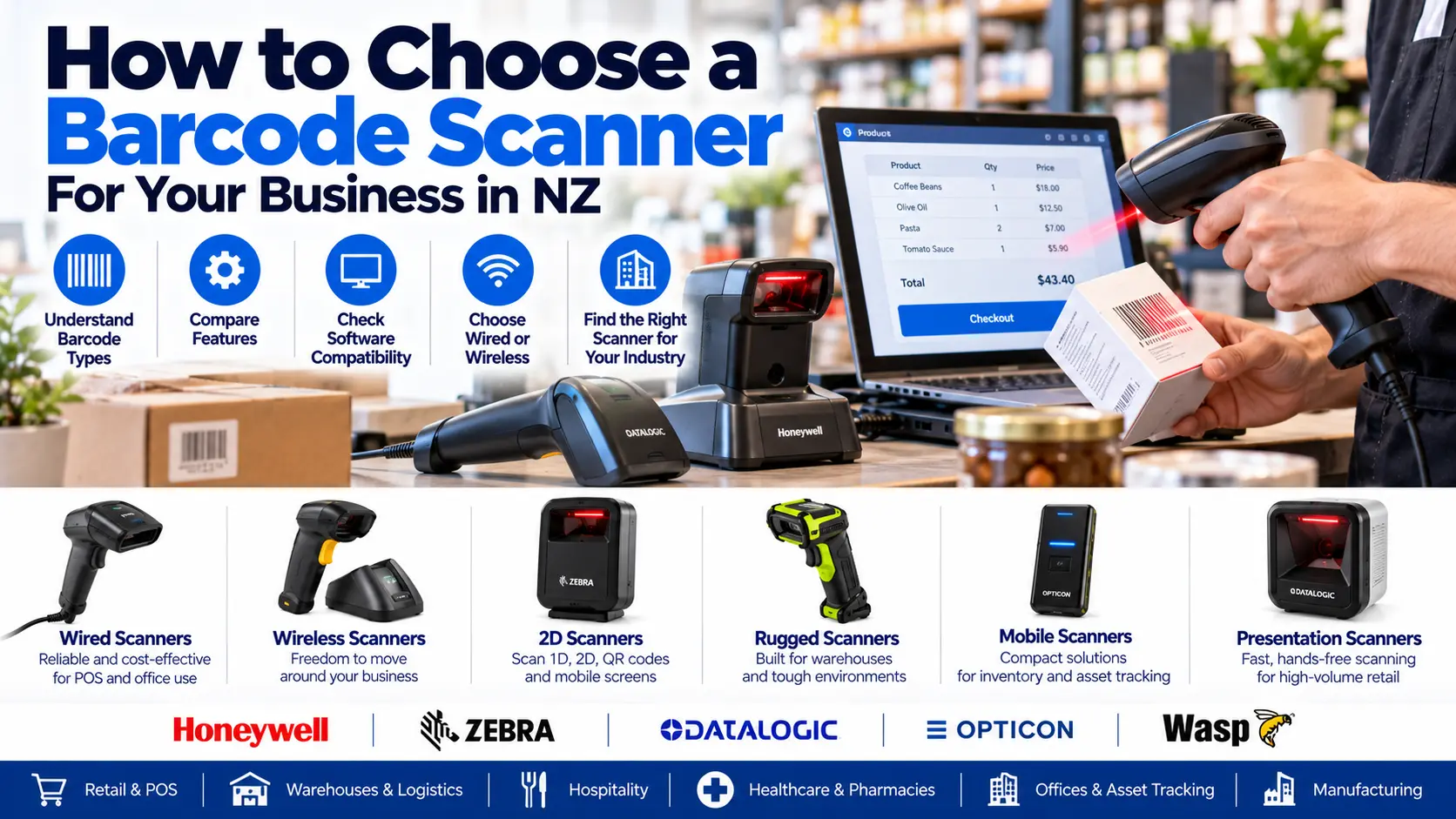
Why Choosing the Right Barcode Scanner Matters
Barcode scanners are essential tools for many New Zealand businesses. From retail checkouts and supermarkets to warehouses, pharmacies, libraries and asset tracking systems, the right scanner can improve accuracy, speed up data entry and reduce manual processing.
However, not every barcode scanner is suitable for every application. Some scanners read traditional product barcodes, while others support QR codes, damaged labels, mobile phone screens or industrial environments.
At ACP Online, we help Auckland and New Zealand businesses select compatible barcode scanners for point-of-sale (POS), stock control, inventory management and asset tracking applications.
1. Understand the Different Types of Barcode Scanners
1D Barcode Scanners
One-dimensional (1D) barcode scanners read traditional linear barcodes commonly found on retail products, including EAN-13, UPC and Code 128.
They can be a practical option for businesses that only need to scan supported linear barcodes.
2D Barcode Scanners
Two-dimensional (2D) imaging scanners can read supported 1D and 2D codes, including QR codes, Data Matrix and PDF417.
Many 2D imagers can also scan barcodes displayed on smartphone screens, making them suitable for digital vouchers, membership cards and mobile ticketing.
Laser Barcode Scanners
Traditional laser scanners are primarily designed for compatible 1D barcodes. They may be suitable for existing applications but generally cannot decode QR codes.
Area-Imaging Barcode Scanners
Area imagers use an image sensor to capture and decode supported barcode types. They are commonly used in modern retail, healthcare and logistics applications.
2. Compare 1D and 2D Barcode Scanners
One of the most important purchasing decisions is whether your business needs a 1D-only scanner or a 2D imaging scanner.
- 1D scanners: Suitable for many traditional retail product barcodes.
- 2D scanners: Read supported linear barcodes as well as QR codes and other two-dimensional symbols.
- Screen scanning: Many modern 2D imagers support barcodes displayed on mobile devices.
- Future requirements: A 2D scanner can provide greater flexibility as barcode applications change.
For many businesses purchasing new equipment, a compatible 2D imaging scanner is a sensible option, particularly when QR codes or digital customer interactions are required.
3. Choose Between Wired and Wireless Barcode Scanners
USB Barcode Scanners
USB scanners are widely used at fixed retail checkouts and office workstations. Many operate in keyboard-emulation mode, entering scanned barcode data into a compatible application.
Advantages include straightforward installation, consistent power and no scanner battery charging requirements.
Bluetooth Barcode Scanners
Bluetooth scanners can connect to compatible computers, tablets, mobile devices or dedicated receivers, depending on the model.
They are useful when staff need to move around a shop, stockroom or warehouse.
Wireless Scanners with Dedicated Cradles
Some cordless scanners use a proprietary radio connection through a base station. These systems may provide charging, communication and device management features.
Wireless range depends on the scanner model, building layout and interference.
4. Select a Barcode Scanner for Your Business Environment
Retail Shops and Supermarkets
Retailers generally benefit from fast, accurate scanning of product labels. A handheld or presentation-style 2D scanner may suit a POS checkout.
Warehouses and Distribution Centres
Warehouse operations may require cordless scanners, long-range scanning, rugged housings and compatibility with warehouse management software.
Hospitality Businesses
Restaurants, cafés and entertainment venues may use scanners for stock control, membership cards, vouchers or event tickets.
Healthcare and Pharmacies
Healthcare applications may require specialised barcode support, disinfectant-ready housings and compatibility with the relevant clinical or pharmacy software.
Offices and Asset Tracking
Barcode scanners can support the tracking of laptops, tools, office equipment and fixed assets when connected to suitable asset management software.
5. Check Barcode Scanner Compatibility with Your POS Software
Before purchasing a scanner, confirm that it works with your existing software, operating system and hardware.
Important compatibility questions include:
- Does the scanner support the barcode formats you use?
- Does your POS software accept keyboard-emulation input?
- Is USB, Bluetooth, serial or another interface required?
- Does the software require a specific scanner model or driver?
- Are prefix, suffix or Enter-key settings required?
- Does the scanner need to work with Windows, Android, iOS or another platform?
ACP Online can assist with scanner selection and configuration for compatible retail POS environments, including supported Idealpos installations.
6. Consider Scanning Distance and Barcode Quality
Not all barcode scanners perform equally at different distances or with damaged labels.
Standard-Range Scanners
These are commonly used for checkout counters, office applications and nearby product labels.
Extended-Range Scanners
Suitable industrial scanners may read compatible barcodes from greater distances, helping warehouse staff scan labels on shelving or larger items.
Damaged and Poorly Printed Barcodes
Some advanced imaging scanners can decode partially damaged, low-contrast or poorly printed codes more effectively than basic models. Performance depends on barcode quality and scanner capabilities.
7. Choose the Right Barcode Scanner Brand
Honeywell Barcode Scanners
Honeywell offers handheld, presentation and industrial barcode scanning solutions for retail, logistics and commercial applications.
Zebra Barcode Scanners
Zebra provides barcode scanners and mobile computing equipment for retail, warehousing, healthcare and industrial environments.
Datalogic Barcode Scanners
Datalogic offers handheld, fixed-position and presentation scanners for checkout, logistics and industrial applications.
Opticon Barcode Scanners
Opticon offers compact scanning equipment and data collection devices suitable for selected retail and business applications.
Wasp Barcode Scanners
Wasp offers barcode scanning equipment and related inventory and asset management solutions.
Brand selection should be based on compatibility, required features, product support and total ownership cost rather than brand recognition alone.
8. What Features Should You Look for in a Barcode Scanner?
- Support for required 1D and 2D barcode formats.
- Compatibility with your POS or inventory software.
- Suitable wired or wireless connectivity.
- Reliable scanning of your actual labels.
- Appropriate scanning range and field of view.
- Durability for the operating environment.
- Suitable battery life for cordless operation.
- Comfortable ergonomics for frequent use.
- Manufacturer warranty and support availability.
- Configuration and management options.
9. How Much Does a Barcode Scanner Cost in New Zealand?
Barcode scanner prices vary depending on scanning technology, brand, connectivity, durability and specialised features.
Basic wired scanners are generally less expensive than rugged cordless industrial scanners. Additional costs may include charging cradles, cables, software configuration and technical support.
Businesses should consider total ownership costs, not simply the lowest purchase price.
Visit ACP Online to enquire about barcode scanner options and current availability.
10. Common Barcode Scanner Problems and Troubleshooting
Scanner Is Not Reading Barcodes
Check that the barcode type is supported, the scan window is clean and the label is not damaged. Confirm that the scanner is powered and correctly configured.
Scanner Reads the Wrong Characters
Incorrect keyboard language settings, scanner configuration or data formatting can cause unexpected characters.
Scanner Works but Data Does Not Appear in POS
Check the application input field, connection mode, interface settings and any required scanner suffix configuration.
Wireless Scanner Keeps Disconnecting
Possible causes include low battery charge, wireless interference, pairing problems or excessive distance from the receiver.
Persistent problems may require professional configuration or hardware assessment.
11. How to Maintain Your Barcode Scanner
- Clean the scan window using manufacturer-approved materials.
- Inspect cables and connectors for visible damage.
- Keep cordless scanners charged according to manufacturer guidance.
- Avoid dropping or exposing equipment to unsuitable conditions.
- Check scanner configuration after software changes.
- Replace damaged accessories where appropriate.
Regular maintenance can help maintain scanning performance and reduce avoidable downtime.
12. Barcode Scanner Supply and Setup in Auckland
ACP Online helps New Zealand businesses choose suitable barcode scanning equipment for retail POS, inventory management, asset tracking and commercial applications.
Our services can include equipment selection, compatibility checks, scanner configuration and troubleshooting.
Need Help Choosing a Barcode Scanner?
Whether you need a USB barcode scanner for a checkout counter, a wireless scanner for a warehouse or a 2D scanner for QR codes, contact ACP Online to discuss your requirements.
Scanner configuration, installation and technical support are chargeable unless specifically included in the product description or service agreement.
Frequently asked questions
1. What is the best barcode scanner for a small retail business?
A compatible USB 2D imaging scanner is often a practical choice for small retail businesses because it can read traditional product barcodes and supported QR codes.
2. What is the difference between a 1D and 2D barcode scanner?
A 1D scanner reads supported linear barcodes, while a 2D imaging scanner can read supported linear and two-dimensional barcodes, including QR codes.
3. Can a barcode scanner read QR codes?
A compatible 2D imaging scanner can read QR codes. Traditional 1D-only laser scanners generally cannot.
4. Will any barcode scanner work with my POS system?
Not necessarily. Compatibility depends on the POS software, interface, barcode format and scanner configuration. Confirm requirements before purchasing.
5. Can barcode scanners work with Idealpos?
Many compatible barcode scanners can be configured for Idealpos environments. The correct model and settings depend on the specific installation and software configuration.
6. Is a wireless barcode scanner better than a wired scanner?
Wireless scanners provide mobility, while wired scanners are often simpler for fixed workstations. The better choice depends on the workflow and operating environment.
7. Can barcode scanners read barcodes from mobile phone screens?
Many modern 2D imaging scanners can read supported barcodes displayed on smartphones. Performance depends on scanner capability, screen condition and code quality.
8. What barcode scanner is best for warehouses?
Warehouses often benefit from rugged cordless scanners or mobile computers with suitable scanning range, battery capacity and warehouse software compatibility.
9. How much does a barcode scanner cost in NZ?
Prices vary by brand, scanning technology, interface and durability. ACP Online can help identify suitable equipment and provide current product pricing.
10. Why is my barcode scanner not scanning?
Possible causes include unsupported barcode types, damaged labels, dirty scan windows, connection problems, incorrect configuration or hardware faults.
11. Can barcode scanners be used for asset tracking?
Yes. Compatible scanners can capture asset identifiers and update records in suitable asset management software.
12. Does ACP Online supply and configure barcode scanners?
ACP Online supplies business technology equipment and offers barcode scanner selection, configuration and troubleshooting services for compatible systems.