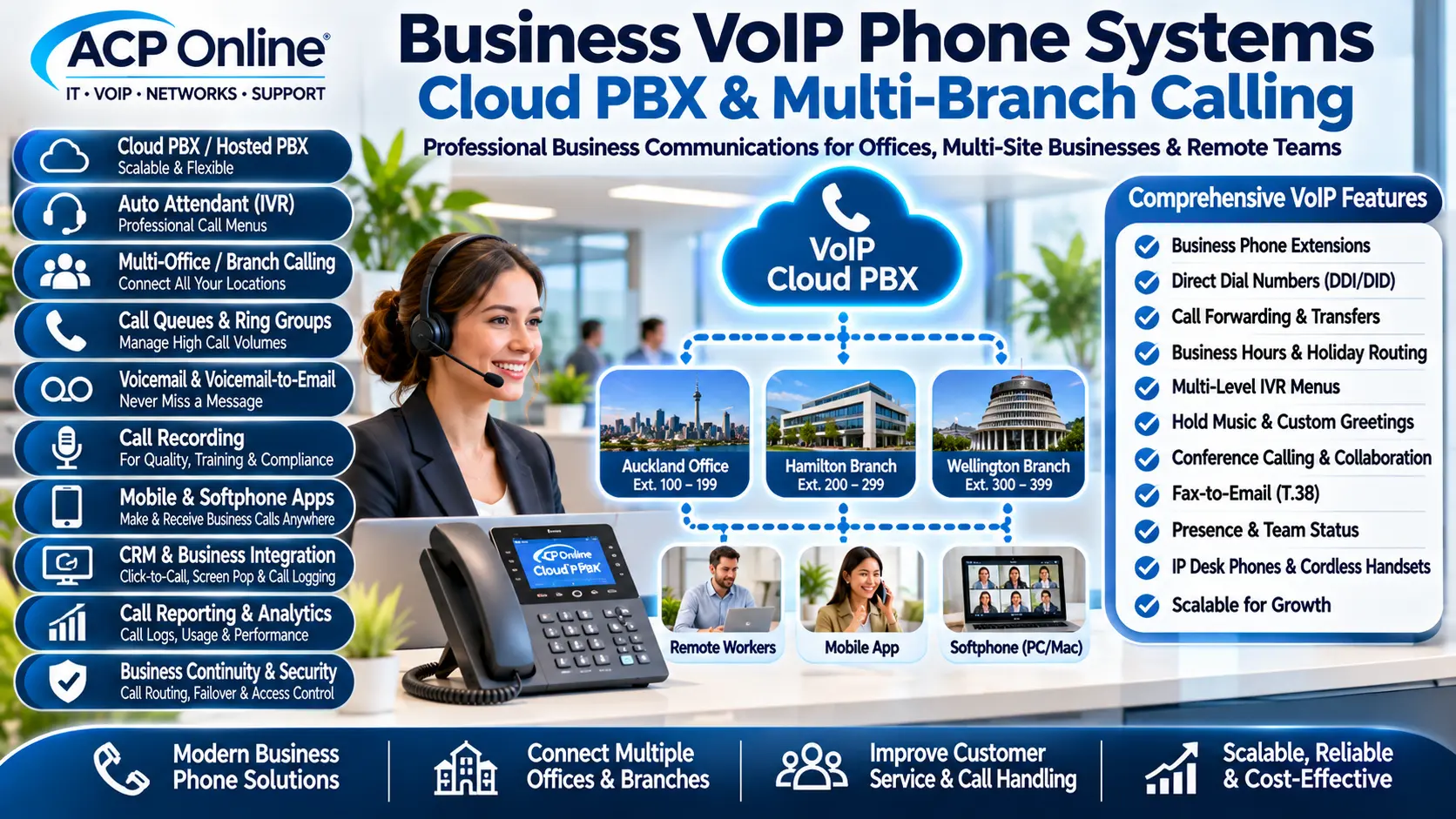
Business VoIP Phone Systems Auckland – Cloud PBX, Multi-Branch Calling & Auto Attendant
ACP Online provides business VoIP telephone installation, cloud PBX configuration, multi-office branch calling, automated attendants, SIP trunking, IP phones and advanced business communications solutions throughout Auckland and New Zealand.
Modern businesses require flexible telephone systems that allow staff to communicate efficiently, manage incoming calls and stay connected across multiple locations.
Whether your business operates from one office, multiple branches, retail stores, warehouses, workshops or remote working locations, a suitable VoIP telephone system can provide centralised call management and professional communication features.
ACP Online can assist with the assessment, installation, configuration, integration, troubleshooting and ongoing support of compatible business VoIP and hosted PBX systems.
Complete Business VoIP & Cloud Telephone Solutions
Voice over Internet Protocol (VoIP) allows telephone calls to be carried over suitable IP networks rather than relying exclusively on traditional telephone lines.
A business VoIP system may use a cloud-hosted PBX, an onsite IP PBX or a hybrid configuration, depending on the organisation's requirements.
Our Business VoIP Services
- Business VoIP telephone system installation
- Cloud-hosted PBX configuration
- On-premises IP PBX installation
- Multi-office and multi-branch calling
- Extension-to-extension calling
- Auto attendant and virtual receptionist
- Interactive Voice Response (IVR) menus
- Multi-level IVR call routing
- Call queues and ring groups
- Call forwarding and transfers
- Business hours and holiday routing
- Voicemail and voicemail-to-email
- Call recording where supported
- SIP trunk configuration
- IP desk phones and cordless handsets
- Softphone and smartphone applications
- Remote worker phone connectivity
- CRM and helpdesk integration
- Call reporting and analytics
- VoIP network troubleshooting
- Telephone system maintenance and upgrades
Cloud PBX & Hosted Business Phone Systems
A cloud PBX is a telephone system where the core call management platform is hosted by a service provider.
Staff can use compatible IP desk phones, desktop softphones or mobile applications to access their business telephone extensions.
Cloud PBX Features
- Centralised extension management
- Incoming and outgoing call routing
- Multiple business telephone numbers
- Call queues and ring groups
- Automated attendants
- Voicemail management
- Remote user connectivity
- Business hours schedules
- Supported call recording
- Call logs and reporting
- Web-based administration
- Scalable user and extension licensing
Cloud PBX features, user limits, storage, calling charges and availability depend on the selected telecommunications platform and service plan.
Multi-Office & Multi-Branch VoIP Telephone Systems
Businesses with multiple offices or branches can benefit from a centrally managed telephone system.
Compatible cloud PBX and IP PBX platforms can connect employees across different physical locations using a common extension plan.
Multi-Branch Calling Features
- Internal extension calling between offices
- Centralised business telephone numbers
- Branch-specific direct dial numbers
- Calls transferred between locations
- Shared reception call handling
- Branch-specific ring groups
- Centralised voicemail management
- Individual office opening hours
- Centralised call reporting
- Remote branch phone provisioning
- Mobile and remote employee extensions
- Common company telephone directory
Example: Multi-Branch Business Calling
A business operating offices in Auckland, Hamilton and Wellington could use a compatible hosted PBX to allow staff to call one another using internal extensions.
- Auckland reception: Extension 100
- Auckland sales: Extension 110
- Hamilton branch: Extension 200
- Wellington branch: Extension 300
- Remote sales representative: Extension 400
Staff may be able to transfer customer calls between offices, answer shared call queues and use company telephone numbers from approved devices.
Extension numbering, internal call charging and cross-site functionality depend on the provider and system architecture.
Auto Attendant & Virtual Receptionist Phone Systems
An auto attendant automatically answers incoming calls and presents callers with recorded greetings and menu options.
This can help businesses direct calls to the appropriate department without requiring a receptionist to manually answer every call.
Example Auto Attendant Greeting
"Thank you for calling our company. For Sales, press 1. For Technical Support, press 2. For Accounts, press 3. For our Hamilton branch, press 4. To speak with Reception, press 0."
Auto Attendant Features
- Professional welcome greetings
- Custom recorded announcements
- Department selection menus
- Direct extension dialling
- Multi-level menu navigation
- Language selection menus
- Business hours greetings
- After-hours announcements
- Public holiday call routing
- Timeout and invalid selection handling
- Operator transfer options
- Voicemail fallback
Interactive Voice Response (IVR) Systems
Interactive Voice Response technology allows callers to interact with a telephone menu using keypad selections and, on supported platforms, speech recognition.
ACP Online can assist with compatible IVR menu design, routing logic and configuration.
Advanced IVR Functions
- Single-level and multi-level IVR menus
- Department and branch selection
- Language-based routing
- Time-based menu selection
- Direct extension dialling
- Queue transfer options
- Voicemail routing
- Recorded information messages
- Supported CRM or API integrations
- Caller identification-based routing where supported
Business Call Queues & Automatic Call Distribution
Call queues help manage multiple incoming calls when employees are busy.
Compatible Automatic Call Distribution (ACD) systems can route calls to available agents according to configured rules.
Call Queue Features
- Hold music
- Queue position announcements where supported
- Estimated waiting information where supported
- Agent availability management
- Round-robin call distribution
- Longest-idle agent routing
- Simultaneous agent ringing
- Priority-based routing
- Queue overflow rules
- Maximum waiting time configuration
- Callback options where supported
- Queue statistics and reporting
Ring Groups & Department Calling
Ring groups allow incoming calls to be directed to several extensions or employees.
Common Ring Group Options
- Ring all available extensions simultaneously
- Ring extensions in a defined sequence
- Rotate calls between staff
- Route unanswered calls to another department
- Send unanswered calls to voicemail
- Forward calls to an external number where supported
Ring groups are suitable for sales teams, reception, customer support, warehouses and branch offices.
Direct Dial-In Numbers (DDI/DID)
Direct dial numbers allow customers to reach specific departments or employees without navigating the main reception menu.
Businesses may use separate numbers for:
- Sales
- Accounts
- Technical support
- Reception
- Individual branches
- Specific employees
Number allocation, portability and geographic number requirements depend on the telecommunications provider.
VoIP Call Forwarding & Call Transfer
Compatible business VoIP systems support flexible call handling for office and remote employees.
Call Handling Features
- Unconditional call forwarding
- Forward when busy
- Forward when unanswered
- Forward when unavailable
- Blind call transfer
- Attended call transfer
- Call hold and resume
- Call waiting
- Call pickup groups
- Call parking
- Call retrieval
- Three-way calling
- Multi-party conference calls
- Supported call delegation
Voicemail & Voicemail-to-Email
Voicemail allows callers to leave messages when employees are unavailable.
Compatible systems can deliver voicemail notifications or audio files to designated email addresses.
Voicemail Features
- Personal voicemail boxes
- Department voicemail
- Custom voicemail greetings
- Voicemail-to-email delivery
- Message waiting indicators
- Remote voicemail access
- Shared voicemail where supported
- Voicemail transcription where supported
- Message retention configuration
Business Hours, After-Hours & Holiday Call Routing
Automated schedules help businesses handle calls differently during opening hours, after hours and public holidays.
Time-Based Routing Options
- Normal business hours
- Lunch break schedules
- Weekend call routing
- Public holiday greetings
- Temporary closure announcements
- Emergency closure messages
- After-hours voicemail
- On-call staff forwarding
- Branch-specific operating hours
Supported platforms can provide separate schedules for different departments or locations.
Business VoIP Call Recording
Compatible VoIP systems can provide call recording for authorised business purposes.
Call Recording Options
- Automatic call recording
- On-demand recording
- Selected extension recording
- Department recording policies
- Call recording search and playback
- Recording access permissions
- Recording retention settings
- Secure recording storage options
- Recording export where supported
Businesses must assess applicable New Zealand privacy, employment, confidentiality and recording requirements, including appropriate notification and access controls.
VoIP Call Reporting & Analytics
Call reporting can help businesses understand call volumes, missed calls and employee availability.
Reporting Features
- Incoming call records
- Outgoing call records
- Missed call reports
- Call duration reporting
- Extension activity
- Department call statistics
- Queue performance reports
- Answered and abandoned calls
- Peak calling periods
- Agent performance statistics where supported
- Call detail record exports
IP Desk Phones & Business Telephone Handsets
ACP Online can assist with compatible business IP telephone equipment.
IP Phone Options
- Entry-level IP desk phones
- Professional business desk phones
- Reception phones with expansion modules
- Colour-screen IP telephones
- PoE-powered IP phones
- Wi-Fi IP phones where supported
- Bluetooth headset-compatible phones
- DECT cordless VoIP handsets
- Conference room speakerphones
- Compatible video IP phones
Device compatibility must be checked against the selected hosted PBX or IP PBX platform.
Softphones & Business Calling Apps
Softphone applications allow employees to make and receive business calls through compatible computers, smartphones or tablets.
Softphone Features
- Business extension on a computer
- Business calling from a smartphone
- Remote office connectivity
- Incoming call notifications
- Call transfer and hold
- Contact directories
- Voicemail access
- Presence information where supported
- Bluetooth headset integration
- Supported desktop and mobile platforms
Mobile app performance depends on network coverage, operating system permissions, provider capabilities and internet connectivity.
Remote Worker & Work-From-Home VoIP Solutions
Cloud VoIP systems can allow authorised employees to access business calling functions outside the main office.
Suitable solutions may support:
- Home office IP phones
- Desktop softphones
- Mobile business calling applications
- Shared company extension directories
- Remote call transfers
- Business caller ID presentation
- Remote voicemail access
- Supported encrypted connectivity
SIP Trunking & Business Telephone Number Management
SIP trunking connects a compatible PBX telephone system to a telecommunications service provider using IP-based communication.
SIP Trunking Services
- SIP account configuration
- Compatible PBX trunk registration
- Incoming and outgoing call routing
- Direct dial number mapping
- Concurrent call channel planning
- Outbound caller ID configuration
- Telephone number porting coordination
- Call routing troubleshooting
- SIP registration fault diagnosis
- Codec and interoperability assessment
Number porting, calling charges, emergency service registration and SIP trunk availability depend on the provider.
CRM, Helpdesk & Business Software Integration
Selected VoIP systems support integration with customer relationship management and helpdesk software.
Potential CRM Integration Features
- Click-to-call from customer records
- Incoming caller identification
- Customer screen pop-ups
- Call activity logging
- Call history association
- Helpdesk ticket integration
- Supported API and webhook connectivity
- Compatible contact synchronisation
Integration availability depends on the selected PBX, CRM platform, API access and licensing.
VoIP Reception Consoles & Operator Panels
Businesses receiving high call volumes may benefit from a receptionist console or operator panel.
Reception Features
- View employee extension status
- Monitor incoming calls
- Transfer calls between departments
- Manage parked calls
- Access shared telephone directories
- Monitor ring groups
- Handle multiple incoming calls
- Use compatible busy lamp field indicators
Business VoIP Conference Calling & Collaboration
Compatible business phone systems may support:
- Three-way telephone calls
- Multi-party audio conferences
- Conference room IP speakerphones
- Desktop and mobile calling
- Video meetings on supported platforms
- Presence and availability indicators
- Internal team messaging where supported
- Integration with selected collaboration platforms
Advanced Business VoIP Features
Depending on the PBX platform, advanced features may include:
- Hot desking and extension login
- Shared line appearance
- Busy lamp field (BLF)
- Speed dial configuration
- Paging and intercom calling
- Do Not Disturb schedules
- Call screening
- Caller ID-based routing
- Anonymous call rejection
- Call barring and dial restrictions
- Outbound dial plans
- Extension permission groups
- Authorisation codes
- Custom music on hold
- Recorded information announcements
- Call whisper, monitor and barge functions where authorised
- Queue callback where supported
- Fax-to-email or T.38 fax integration where supported
- Call recording retention policies
- Automatic phone provisioning
- Centralised device configuration
- Supported high-availability and failover options
VoIP Network Installation & Call Quality Optimisation
Reliable network infrastructure is essential for good VoIP call quality.
ACP Online provides business networking and troubleshooting services to help identify connectivity and performance problems.
VoIP Networking Services
- Business router configuration
- Network switch installation
- Power over Ethernet (PoE) configuration
- Voice VLAN planning
- Quality of Service (QoS) configuration
- Network latency testing
- Packet loss troubleshooting
- Jitter assessment
- Firewall and NAT troubleshooting
- SIP ALG compatibility assessment
- Ethernet cable testing
- RJ45 wall outlet troubleshooting
- Wi-Fi calling performance assessment
- Broadband connectivity troubleshooting
VoIP Security & Fraud Prevention
Business telephone systems should be configured with appropriate security controls.
VoIP Security Measures
- Strong extension and administrator passwords
- Role-based administration permissions
- Secure SIP transport where supported
- Encrypted media where supported
- IP address restrictions
- Outbound call restrictions
- International calling controls
- Call spending limits where supported
- Account monitoring and alerting
- Firmware and software updates
- Network segmentation
- Remote access security
- Configuration backups
VoIP Internet Outages & Business Continuity
VoIP telephone services depend on suitable network connectivity and power availability.
ACP Online can assess business continuity arrangements such as:
- Compatible mobile call forwarding
- Secondary broadband connections
- 4G or 5G internet failover
- UPS backup for routers and network equipment
- Cloud PBX rerouting options
- Alternative contact numbers
- Provider-supported failover policies
Failover arrangements must be tested and are subject to provider and network availability. No configuration can guarantee uninterrupted telephone service.
Emergency Calling & Business VoIP
Businesses must understand how emergency calling operates on their selected VoIP service.
Unlike some traditional telephone services, VoIP equipment may stop working during power failures or internet outages unless suitable backup arrangements are in place.
Emergency calling support, caller location information and service limitations must be confirmed with the telecommunications provider, particularly for mobile extensions and multi-site deployments.
VoIP Telephone System Migration & Upgrades
ACP Online can assist businesses transitioning from older telephone equipment to compatible IP-based communications.
Migration Services
- Existing telephone system assessment
- Business extension planning
- Telephone number porting coordination
- Hosted PBX configuration
- IP phone installation
- Auto attendant setup
- Call queue configuration
- Voicemail migration planning
- Network readiness assessment
- Call testing and commissioning
- Staff handover and basic training
VoIP Solutions for Different Business Types
ACP Online can assess suitable business telephone systems for:
- Multi-office businesses
- Retail stores and franchise branches
- Medical and dental practices
- Professional offices
- Accounting and legal firms
- Warehouses and distribution centres
- Workshops and service businesses
- Hotels and hospitality venues
- Schools and educational organisations
- Community clubs and associations
- Call centres and customer support teams
- Remote and hybrid workforces
VoIP Telephone Troubleshooting & Repairs Auckland
ACP Online provides troubleshooting for suitable VoIP equipment, networks and compatible telephone systems.
Common VoIP Problems
- IP phone not registering
- No incoming calls
- Outgoing calls failing
- One-way audio
- No audio during calls
- Calls disconnecting
- Choppy or distorted audio
- Call transfer failures
- Auto attendant not working
- Voicemail delivery problems
- SIP registration errors
- Phone not powering on
- PoE switch faults
- VoIP not working after changing internet providers
- Remote extension connectivity issues
Our Business VoIP Installation Process
- Consultation: Discuss business calling requirements and existing telephone arrangements.
- Site and network assessment: Review internet connectivity, network equipment and phone locations.
- System design: Plan extensions, telephone numbers, departments, branches and call routing.
- Quotation: Confirm proposed equipment, installation and provider-related charges.
- Configuration: Set up the compatible PBX, users, phones and calling features.
- Installation: Connect and provision approved IP telephone equipment.
- Testing: Verify incoming, outgoing, internal and inter-branch calls.
- Handover: Explain telephone operation and administrator functions.
- Support: Provide ongoing technical assistance as agreed.
Why Choose ACP Online for Business VoIP?
- Integrated IT and telecommunications: VoIP phones, networking, Wi-Fi and business technology.
- Multi-branch solutions: Centralised extension and call routing configuration.
- Advanced call management: IVR, auto attendants, queues, ring groups and voicemail.
- Existing system troubleshooting: Network and compatible VoIP fault diagnosis.
- Business continuity planning: Connectivity and failover assessments.
- Transparent technical support rates: Published Auckland service charges.
Business VoIP Installation & Cloud PBX Costs
Business VoIP pricing depends on the selected provider, number of users, telephone equipment, calling plans and required features.
Potential costs include:
- Cloud PBX user subscriptions
- Business telephone numbers
- Local, national and international calling
- SIP trunk services
- IP desk phones and headsets
- Call recording and storage
- Advanced call queue licensing
- CRM integration
- Number porting charges where applicable
- Network upgrades
- Installation and commissioning
- Ongoing support
ACP Online can prepare a tailored quotation after reviewing the requirements.
VoIP Technical Support Rates
For applicable technical support work, ACP Online's standard business-hours rates are:
- Central Auckland onsite: $65 call-out plus $170 per hour, minimum one hour.
- Outer Auckland onsite: $95 call-out plus $170 per hour, minimum one hour.
- Workshop/offsite support: $170 per hour, minimum one hour.
All rates exclude GST. Additional labour is charged in 30-minute increments after the first hour.
Equipment, software, cloud subscriptions, calling charges and third-party provider services are charged separately where applicable.
Standard business hours are Monday to Friday, 8:00 AM to 5:00 PM, excluding public holidays.
View our Technical Support Rates & Terms.
Request a Business VoIP & Cloud PBX Quote
Planning a new business telephone system, replacing an older PBX or connecting multiple office branches?
ACP Online can assess suitable hosted PBX, VoIP, SIP trunking, IP phone and advanced call management options.
When contacting us, please provide:
- Business name and location
- Number of offices or branches
- Number of employees requiring extensions
- Existing telephone provider
- Current business telephone numbers
- Auto attendant and IVR requirements
- Call queue and ring group requirements
- Remote worker requirements
- Call recording or CRM integration requirements
- Preferred installation timeframe
Contact ACP Online for business VoIP telephone systems, cloud PBX, multi-branch calling, automated attendants, SIP trunking and VoIP support in Auckland.
Frequently asked questions
1. What is a business VoIP phone system?
VoIP uses an IP network to carry telephone calls. It can provide features such as extensions, auto attendants, voicemail, call queues and remote calling.
2. What is a cloud PBX?
Yes. Compatible hosted PBX systems can connect multiple branches with shared call routing, extension numbering and centralised administration.
4. Can staff call between branches using extension numbers?
Yes. Compatible systems can support internal extension calling between branches. Charges and functionality depend on the service provider.
5. What is an auto attendant?
An auto attendant answers incoming calls with a recorded greeting and offers menu options such as “Press 1 for Sales, Press 2 for Support.”
6. What is the difference between an auto attendant and IVR?
An auto attendant primarily routes calls using menus. IVR is a broader technology that may support more advanced interactions, including keypad input, automated information retrieval and speech recognition.
7. Can different branches have different opening hours?
Yes. Supported platforms can use separate schedules and call routing rules for individual offices.
8. Can calls ring multiple staff members simultaneously?
Yes. Ring groups can be configured to ring several extensions at once or according to a defined sequence.
9. Can incoming calls be placed in a queue?
Yes. Compatible systems can place callers in queues and distribute calls according to agent availability and routing rules.
10. Can calls be transferred between Auckland and other NZ branches?
Yes. Compatible multi-site VoIP systems can support transfers between extensions at different locations.
11. Can employees use their business number on a mobile phone?
Yes. Selected platforms offer smartphone applications that allow authorised users to make and receive business calls.
12. Can staff work from home using the same extension?
Yes. Compatible softphones and IP phones can provide remote access to business calling features.
13. Can voicemail messages be sent to email?
Yes. Voicemail-to-email is available on many business PBX platforms.
14. Can business calls be recorded?
Yes, where supported and appropriately configured. Businesses must address applicable privacy and recording obligations.
15. Can the system show missed calls and call statistics?
Yes. Supported platforms provide call logs, missed-call reports, queue statistics and other analytics
16. Can we keep our existing business phone number?
Often, yes. Number portability depends on the current and receiving providers, number type and applicable requirements.
17. Can VoIP integrate with our CRM software?
Selected PBX platforms support CRM integrations such as click-to-call, customer screen pop-ups and call activity logging.
18. What happens to VoIP during an internet outage?
Calls may fail unless suitable alternative connectivity or provider-supported forwarding arrangements are available.
19. Can VoIP phones work during a power outage?
Only if the required network equipment and telephone devices have suitable backup power, or alternative calling arrangements are available.
20. Can VoIP be used to call 111 in New Zealand?
Many VoIP services support emergency calling, but availability, location handling and outage limitations must be confirmed with the provider.
21. Can different departments have separate telephone numbers?
Yes. Compatible PBX systems can assign direct dial numbers to departments, branches or individual extensions.