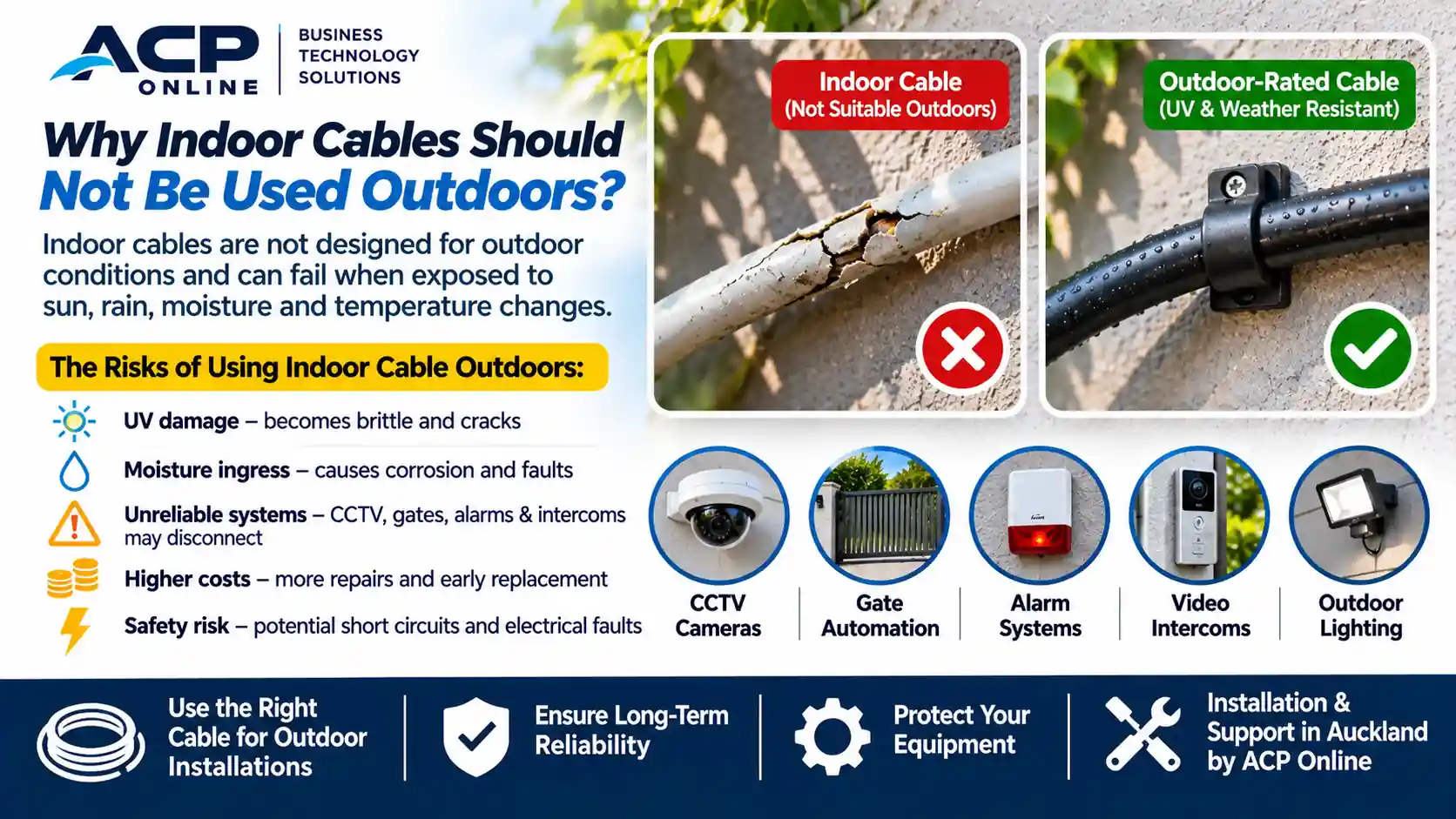
Why Indoor Cables Should Not Be Used Outdoors – CCTV, Gate Automation, Alarms, Intercoms & Lighting
Using indoor-rated cables outdoors is one of the common causes of premature cable deterioration, intermittent equipment faults and unreliable security systems. While an indoor cable may initially work when installed outside, it may not be designed to withstand prolonged sunlight, moisture, temperature changes or other environmental conditions.
This is particularly important for outdoor CCTV cameras, automatic gates, alarm systems, video intercoms, access control equipment and exterior lighting.
At ACP Online, we assist Auckland homeowners and businesses with CCTV troubleshooting, network cabling faults, intercom connectivity, security systems and gate automation-related technology services.
In this guide, our technical team explains why indoor cables are generally unsuitable for exposed outdoor installations, how incorrect cable selection can damage equipment and what types of cables should be considered instead.
What Is the Difference Between Indoor and Outdoor Cable?
The main difference between indoor and outdoor cable is the environment for which the cable has been designed and rated.
Indoor-Rated Cables
Indoor cables are generally intended for protected environments such as offices, homes, equipment rooms, ceilings and internal wall cavities.
Depending on their construction, they may not be designed for continuous exposure to sunlight, rain, standing water or outdoor temperature variations.
Examples include:
- Standard indoor Cat5e and Cat6 Ethernet cables
- Indoor alarm and security signal cables
- Internal telephone and communication cables
- General-purpose low-voltage wiring intended for protected locations
Outdoor-Rated Cables
Outdoor-rated cables are manufactured for specified environmental conditions and may include UV-resistant jackets, moisture-resistant construction, suitable insulation and additional mechanical protection.
Not every outdoor cable is suitable for every application. For example, a UV-resistant cable designed for above-ground use may not be suitable for direct burial or prolonged exposure to water.
The correct cable must be selected according to the manufacturer's rating, electrical requirements and installation conditions.
1. UV Radiation Can Damage Indoor Cable Jackets
One of the biggest problems with installing unsuitable indoor cable outdoors is prolonged exposure to ultraviolet radiation from sunlight.
Some indoor cable jackets can deteriorate when exposed to UV radiation, particularly where the cable is installed on exterior walls, fences, roofs or exposed cable trays.
Over time, the jacket may:
- Become brittle
- Develop cracks
- Lose flexibility
- Split around bends
- Expose underlying insulation
- Allow moisture to reach internal conductors
Once the protective jacket deteriorates, the cable becomes more vulnerable to moisture, corrosion and physical damage.
Recommended approach: Use cable specifically rated for the expected UV exposure or install a suitable cable within a properly designed protective wiring system.
2. Water and Moisture Can Cause Cable Failure
Outdoor installations are exposed to rain, condensation, humidity and temperature changes.
If moisture enters a cable through damaged insulation, poorly sealed connectors or unsuitable cable entry points, it can cause serious reliability problems.
Possible consequences include:
- Corrosion of copper conductors
- Damaged RJ45 connectors
- Intermittent network connections
- Power over Ethernet failures
- Increased signal attenuation
- Short circuits
- Insulation deterioration
- Unreliable equipment operation
Water ingress is particularly problematic because the cable may continue operating intermittently before eventually failing completely.
This can make the actual cause difficult to identify without proper cable testing.
3. Why Indoor Ethernet Cable Is Not Recommended for Outdoor CCTV Cameras
Modern IP CCTV cameras commonly use Ethernet cabling to carry video data and, where supported, electrical power through Power over Ethernet (PoE).
When unsuitable indoor Cat5e or Cat6 cable is installed outdoors, environmental deterioration can affect both network communication and power delivery.
Common CCTV Problems Caused by Unsuitable Cable
- Camera repeatedly disconnecting
- Camera showing offline on the NVR
- Intermittent video loss
- Camera not powering on
- Unstable PoE operation
- Corroded network connectors
- Reduced network performance
- Complete camera communication failure
For example, a CCTV camera installed on an external building wall may operate correctly for several months before developing intermittent faults due to deteriorated cabling or moisture entering an RJ45 connector.
The camera itself may be functioning correctly, but the cable or connector is no longer providing reliable communication.
Recommended Cable for Outdoor IP CCTV
Use appropriately rated outdoor Cat5e or Cat6 Ethernet cable suitable for the installation environment.
Depending on the application, this may include:
- UV-resistant outdoor cable
- Moisture-resistant cable
- Suitable wet-location cable where required
- Appropriate outdoor junction boxes
- Weather-resistant cable glands
- Properly protected network connectors
- Suitable surge protection
For outdoor camera installations, the complete cable route and connection points should be considered rather than focusing only on the camera's weatherproof rating.
4. Why Correct Cable Selection Matters for Automatic Gates
Automatic gates can contain several different electrical and communication circuits.
These may include:
- Gate motor power supplies
- Control signals
- Safety photocells
- Vehicle detection equipment
- Intercom communication
- Access control readers
- Keypads and push buttons
- Gate status sensors
Each circuit may require a different cable type, conductor size, voltage rating and installation method.
Using unsuitable indoor cable for exposed gate control wiring can lead to intermittent signals, corrosion and unreliable operation.
For mains-powered gate motors, incorrect cable selection can also create electrical safety risks.
Potential Gate Automation Problems
- Gate not responding to controls
- Intermittent opening or closing commands
- Safety photocell faults
- Unreliable access control operation
- Communication failures between devices
- Damaged wiring and connectors
Important: Gate motor power wiring must use appropriately rated electrical cable installed in accordance with applicable New Zealand electrical safety requirements.
Gate safety devices must be correctly selected, installed and tested. Cable faults must never be addressed by bypassing safety sensors or protective functions.
5. Indoor Alarm Cable Can Fail in Outdoor Security Installations
Alarm systems frequently use low-voltage wiring to connect sensors, keypads, sirens and control equipment.
While standard indoor alarm cable may be suitable for protected internal areas, exposed outdoor wiring requires additional consideration.
Examples of outdoor alarm equipment include:
- External motion detectors
- Outdoor sirens
- Perimeter security sensors
- Gate contact sensors
- External beam detectors
- Outdoor security keypads
If unsuitable cable deteriorates, it may cause intermittent sensor communication, circuit faults, false alarms or loss of detection.
Recommended Approach for Outdoor Alarm Wiring
Use cable suitable for the environmental conditions, electrical characteristics and equipment manufacturer's requirements.
Protect connections against moisture and mechanical damage, and ensure alarm circuits are correctly tested after installation.
6. Outdoor Video Intercoms Need Suitable Cabling
Modern video intercom systems may use Ethernet, two-wire communication, power cables or manufacturer-specific wiring arrangements.
Outdoor intercom stations are commonly installed at front gates, office entrances, apartment buildings and pedestrian access points.
Although the intercom unit may be weather-resistant, the associated cable and connections must also be suitable for outdoor conditions.
Problems Caused by Unsuitable Intercom Cable
- Intercom calls disconnecting
- Distorted or interrupted audio
- Video feed freezing
- Indoor monitor losing communication
- Intermittent door release operation
- Network connectivity failures
- Corrosion of terminals and connectors
For IP video intercoms, outdoor-rated Ethernet cabling may be appropriate where specified by the manufacturer.
For two-wire systems, the selected cable must meet the equipment's conductor, distance and installation requirements.
ACP Online supplies and supports suitable video intercom and access control solutions, including Akuvox intercom systems.
7. Outdoor Lighting Requires Correctly Rated Electrical Cable
Outdoor lighting installations are exposed to moisture, temperature changes and sometimes direct sunlight.
Using unsuitable cable for outdoor lighting can lead to insulation failure, electrical faults and potentially dangerous conditions.
Outdoor lighting applications include:
- Security floodlights
- Garden lighting
- Driveway lights
- Building exterior lighting
- Car park lighting
- Landscape lighting
The correct wiring depends on whether the lighting system operates at mains voltage or through a suitable extra-low-voltage supply.
Outdoor electrical installations must use appropriately rated cable, fittings, protection and installation methods.
Safety warning: Mains electrical wiring must be carried out by an appropriately licensed electrical worker where required under New Zealand law. Never use Ethernet or general-purpose alarm cable as a substitute for mains electrical wiring.
8. Does Installing Indoor Cable Inside Conduit Make It Suitable for Outdoors?
Not automatically.
Conduit can provide mechanical protection and may reduce exposure to sunlight, but it does not necessarily prevent moisture entering the wiring system.
Outdoor and underground conduits can accumulate water through condensation or water ingress.
Therefore, a cable installed inside conduit must still be suitable for the environmental conditions expected within that conduit.
For example, an underground conduit may be considered a wet environment even if the cable is not directly buried in soil.
The correct cable and conduit arrangement must be selected for the particular installation.
9. Can Indoor Cable Be Used Outdoors Temporarily?
Temporary outdoor use should not be assumed safe simply because the installation is intended to operate for a short period.
Some cables are specifically manufactured and rated for temporary outdoor applications, while ordinary indoor cables may not be suitable for rain, UV exposure or mechanical hazards.
Any temporary installation should use equipment and wiring rated for its actual conditions and comply with applicable safety requirements.
10. Why Outdoor Cable Quality Matters for Power over Ethernet
Power over Ethernet allows compatible IP cameras, access control devices and intercoms to receive electrical power and network data through Ethernet cabling.
However, poor-quality or deteriorated cabling can increase resistance, voltage drop and connection problems.
This can result in:
- Devices failing to start
- Intermittent reboots
- Camera disconnections
- Reduced reliability under load
- Overheating at damaged or high-resistance connections
For reliable PoE installations, use suitable copper network cable with the correct conductor specification, environmental rating and installation method.
Where applicable, avoid copper-clad aluminium (CCA) cabling for standards-based structured network and PoE installations.
11. Underground Cabling Requires Special Consideration
Underground cable installations may be exposed to moisture, soil conditions, physical pressure and accidental damage.
Standard indoor Ethernet or alarm cable should not be assumed suitable for direct burial.
Depending on the application, underground installations may require:
- Direct-burial-rated cable
- Wet-location-rated cable
- Appropriate underground conduit
- Mechanical protection
- Suitable cable depth and routing
- Weatherproof or underground-rated joints
- Correct separation from electrical circuits
- Surge and electrical protection where required
For network connections between separate buildings, fibre-optic cable may be preferable in some situations because it provides electrical isolation and is not affected by differences in earth potential in the same way as copper communications cabling.
12. Signs Your Outdoor Cable May Be Failing
Outdoor cabling problems can develop gradually.
Warning signs include:
- CCTV cameras repeatedly going offline
- Intercom audio or video cutting out
- Gate controls operating intermittently
- Alarm sensors reporting unexplained faults
- Network devices randomly restarting
- Visible cracking or discolouration of cable jackets
- Corrosion around connectors
- Water inside junction boxes
- Equipment faults after heavy rain
- Repeated failure of outdoor communication devices
If these symptoms occur, the cabling and connections should be inspected before replacing expensive equipment.
13. Can Damaged Outdoor Cables Be Repaired?
Some outdoor cable faults can be repaired by replacing damaged sections, connectors or terminations.
However, if the cable jacket has deteriorated along a significant length, replacing the cable is often the more reliable long-term solution.
Repairs must use suitable cable, connectors, joints and environmental protection.
Simply wrapping a severely deteriorated cable in ordinary electrical tape is not a reliable substitute for correctly rated cabling.
14. Does Using the Wrong Cable Affect Equipment Warranty?
Incorrect cable selection or installation may contribute to equipment damage and could affect warranty coverage where the fault results from installation conditions outside the manufacturer's requirements.
Warranty outcomes depend on the product, manufacturer terms, the cause of failure and applicable consumer law.
Correct cable selection and installation records can help support future maintenance and warranty assessments.
15. Outdoor Cable Installation and Electrical Safety in New Zealand
New Zealand electrical installations must comply with applicable electrical safety legislation and relevant standards.
Requirements vary according to whether the installation involves mains electricity, extra-low-voltage equipment, telecommunications or other systems.
For mains electrical installations, cable selection, protection, installation and testing must be completed by appropriately qualified personnel where required.
For CCTV, intercom, alarm and networking installations, the equipment manufacturer's specifications and relevant installation standards should also be followed.
Outdoor cable selection should consider:
- UV exposure
- Moisture and water ingress
- Operating temperature
- Electrical voltage and current
- Mechanical protection
- Cable routing and support
- Conduit and underground conditions
- Surge protection
- Connector and junction box ratings
- Manufacturer installation requirements
Why Choose ACP Online for Outdoor CCTV, Intercom and Network Cabling?
ACP Online provides technology installation, troubleshooting and support services for residential and commercial customers in Auckland.
Our relevant services include:
- Outdoor CCTV camera installation and troubleshooting
- IP camera network connectivity testing
- Ethernet cable fault diagnosis
- PoE network troubleshooting
- Outdoor network cable replacement
- Video intercom installation and support
- Gate automation communication troubleshooting
- Alarm system connectivity diagnostics
- Access control system installation
- Security system upgrades
- Network and communication equipment support
Where work involves mains electrical wiring, an appropriately licensed electrical worker must undertake the relevant work.
Get Your Outdoor Security and Network Cabling Checked
If your CCTV cameras keep disconnecting, your gate intercom stops working after rain or your outdoor alarm equipment is experiencing intermittent faults, the problem may be caused by unsuitable or deteriorated cabling.
Before replacing expensive cameras, intercoms or other equipment, consider arranging a professional cable and system assessment.
ACP Online can assist with diagnosing outdoor CCTV, networking, intercom and related security system faults in Auckland.
Visit ACP Online to enquire about installation, repairs, troubleshooting and technical support.
ACP Online – CCTV, Networking, Intercom & Security Technology Solutions, Auckland, New Zealand.
Article by ACP Online Technical Team. Cable suitability depends on its manufacturer rating and installation environment. Electrical installation requirements must be assessed by appropriately qualified professionals.
Frequently asked questions
1. Can indoor Cat6 cable be used outdoors?
Standard indoor Cat6 cable should not be used in exposed outdoor installations unless the manufacturer specifically rates it for those conditions. UV-resistant outdoor cable is generally recommended where sunlight exposure is expected.
2. What happens if indoor Ethernet cable gets wet?
Moisture can enter through damaged jackets or connectors and cause corrosion, signal loss, increased resistance and intermittent network failures.
3. What is the best cable for outdoor CCTV cameras?
For IP CCTV cameras, properly rated outdoor Cat5e or Cat6 cable is commonly used. The correct choice depends on exposure to UV, moisture, conduit conditions, PoE requirements and the equipment specifications.
4. Can indoor cable be installed outdoors inside conduit?
Sometimes, but only when the cable is rated for the actual conditions inside the conduit. Outdoor or underground conduit may contain moisture, so conduit alone does not make an indoor cable suitable.
5. Can the wrong cable cause CCTV cameras to disconnect?
Yes. Deteriorated insulation, corroded connectors, damaged conductors and unstable PoE delivery can cause cameras to disconnect intermittently.
6. Why does my gate intercom stop working after rain?
Water may be entering a cable, junction box, connector or the intercom itself. Professional testing can identify whether the problem involves wiring, power or equipment.
7. Can I use alarm cable for outdoor lighting?
Only if the cable is specifically suitable for the electrical and environmental requirements of that lighting circuit. Standard alarm signal cable must not be used as a substitute for mains electrical wiring.
8. Does outdoor Ethernet cable need to be waterproof?
It must be suitable for its expected moisture exposure. A UV-resistant cable is not necessarily suitable for direct burial or continuous wet conditions.
9. Can damaged outdoor cable be repaired?
Some faults can be repaired using suitable replacement sections, connectors and protected joints. Widespread jacket deterioration often makes full cable replacement the better option.
10. Does ACP Online repair outdoor CCTV and intercom cabling in Auckland?
ACP Online provides CCTV, networking and intercom troubleshooting and related technical services in Auckland. The required work and any electrical licensing requirements are assessed according to the installation.
Related services
ACP Online provides professional CCTV installation, repairs, upgrades and maintenance across Auckland. We specialise in residential and commercial security camera systems, including Hikvision and Dahua, with remote viewing, reliable recording and expert technical support.
ACP Online provides professional CCTV repairs, troubleshooting and preventative maintenance across Auckland. We service compatible Dahua, Hikvision and other security camera systems, including DVR/NVR recorders, faulty cameras, blurry night vision, recording failures and remote viewing problems.
Security alarm systems in Auckland for homes and businesses. ACP Online provides burglar alarm installation, repairs, upgrades and maintenance. Enquire today.
ACP Online provides professional access control installation, configuration, upgrades and maintenance across Auckland. We specialise in electronic door entry systems, RFID cards, keypads, biometric access, Paxton systems and integrated security solutions for offices, gyms, retail premises, apartment buildings and commercial properties.
ACP Online provides professional intercom installation, repairs, upgrades and support in Auckland, New Zealand. We offer video intercoms, IP door entry systems, gate intercoms, apartment intercoms and smart access control solutions for homes, offices, schools, body corporates and commercial properties. Our services include equipment selection, installation, network configuration, electric door lock integration, mobile app setup and troubleshooting.
ACP Online provides automatic gate installation, automation upgrades, troubleshooting and access control solutions for residential and commercial properties throughout Auckland. Our services cover sliding gates, swing gates, electric gate motors, remote controls, keypad access, video intercoms, smartphone-controlled entry and integrated security systems. Whether you need to automate an existing driveway gate, repair a faulty motor or improve your property's entrance security, ACP Online can assess your requirements and recommend a suitable solution.
ACP Online provides professional IT installation and technical support services throughout Auckland for businesses, offices, retail stores and residential customers. Our services include computer and workstation setup, hardware installation, network and Wi-Fi configuration, printer installation, IT troubleshooting, equipment upgrades, software configuration and remote or onsite support. Whether you're setting up a new office, upgrading existing equipment or resolving an IT problem, ACP Online can help keep your technology operating efficiently.
ACP Online provides professional Akuvox video intercom installation, programming, troubleshooting, upgrades and technical support throughout Auckland. We install and configure compatible Akuvox door stations, indoor monitors, smartphone intercom systems, electronic door locks and access control equipment for residential and commercial properties. Our services include Akuvox SmartPlus setup, SIP and IP network configuration, remote door release, visitor communication, system repairs and integration with compatible access control systems.
ACP Online provides professional internet, broadband, Wi-Fi and network troubleshooting for homes and businesses throughout Auckland. We diagnose internet outages, slow connections, faulty routers, network wall outlets, damaged Ethernet cables, network switches, Wi-Fi coverage problems and connectivity issues following internet provider changes. Our technical services include network cable tracing, Ethernet testing, ping and traceroute diagnostics, network configuration, router setup, Wi-Fi optimisation and fault isolation between your local network and internet service provider.
ACP Online provides IT, networking, internet connectivity and audio-visual technology solutions for schools, colleges, training organisations and educational institutions throughout Auckland. Our services include school Wi-Fi and network installation, broadband troubleshooting, classroom projectors, interactive displays, audio systems, video conferencing, auditorium AV, computer support, CCTV, access control and technology assistance for online learning environments. From individual classroom upgrades to school-wide technology improvements, ACP Online can assess, install, configure, troubleshoot and maintain suitable education technology systems.
ACP Online provides integrated school intercom, gate automation, ANPR vehicle recognition and electronic access control solutions throughout Auckland. Our services include Akuvox, Dahua and Hikvision video intercoms, automatic sliding and swing gates, Shelly Cloud smartphone controls, ANPR-enabled staff parking access, visitor entry management, CCTV integration and gate safety beams. We help schools improve entrance management, control authorised access and connect gate automation with reception and security systems.
ACP Online provides smart laundromat automation and technology solutions for self-service laundries and commercial laundry businesses throughout Auckland. Our services include compatible remote washing machine and dryer controls, smartphone monitoring, CCTV surveillance, digital advertising displays, background music, public address systems, automatic roller door controls, intrusion alarms, internet and Wi-Fi networking, and integrated remote management. Whether you are opening a new laundromat, upgrading an existing laundry or troubleshooting technology at an unattended facility, ACP Online can help design, install, configure and support suitable systems.
ACP Online provides integrated IT, technology, security and business management solutions for community clubs, sports clubs, social clubs, bowling clubs, cultural associations and not-for-profit organisations throughout Auckland. Our services include EFTPOS and point-of-sale systems, bar and kitchen stock control, CCTV, electronic access control, VoIP telephone systems, security alarms, website design and hosting, digital signage, membership CRM, asset management, meeting recording and transcription software, Wi-Fi networking and guest access management. From a small volunteer-run club to a larger community venue, ACP Online can assess, install, configure and support suitable technology to improve day-to-day operations.
ACP Online provides business VoIP telephone systems, cloud PBX solutions, SIP trunking, multi-branch telephone connectivity, auto attendant configuration and advanced business calling features throughout Auckland. Our services include IP desk phones, cordless VoIP handsets, softphones, mobile calling apps, IVR menus, call queues, ring groups, extension-to-extension calling, voicemail-to-email, call forwarding, business hours routing, call recording, CRM integration and remote worker connectivity. Whether you are replacing an older telephone system, connecting multiple offices or establishing a new business phone network, ACP Online can assess, install, configure and support a suitable VoIP solution.