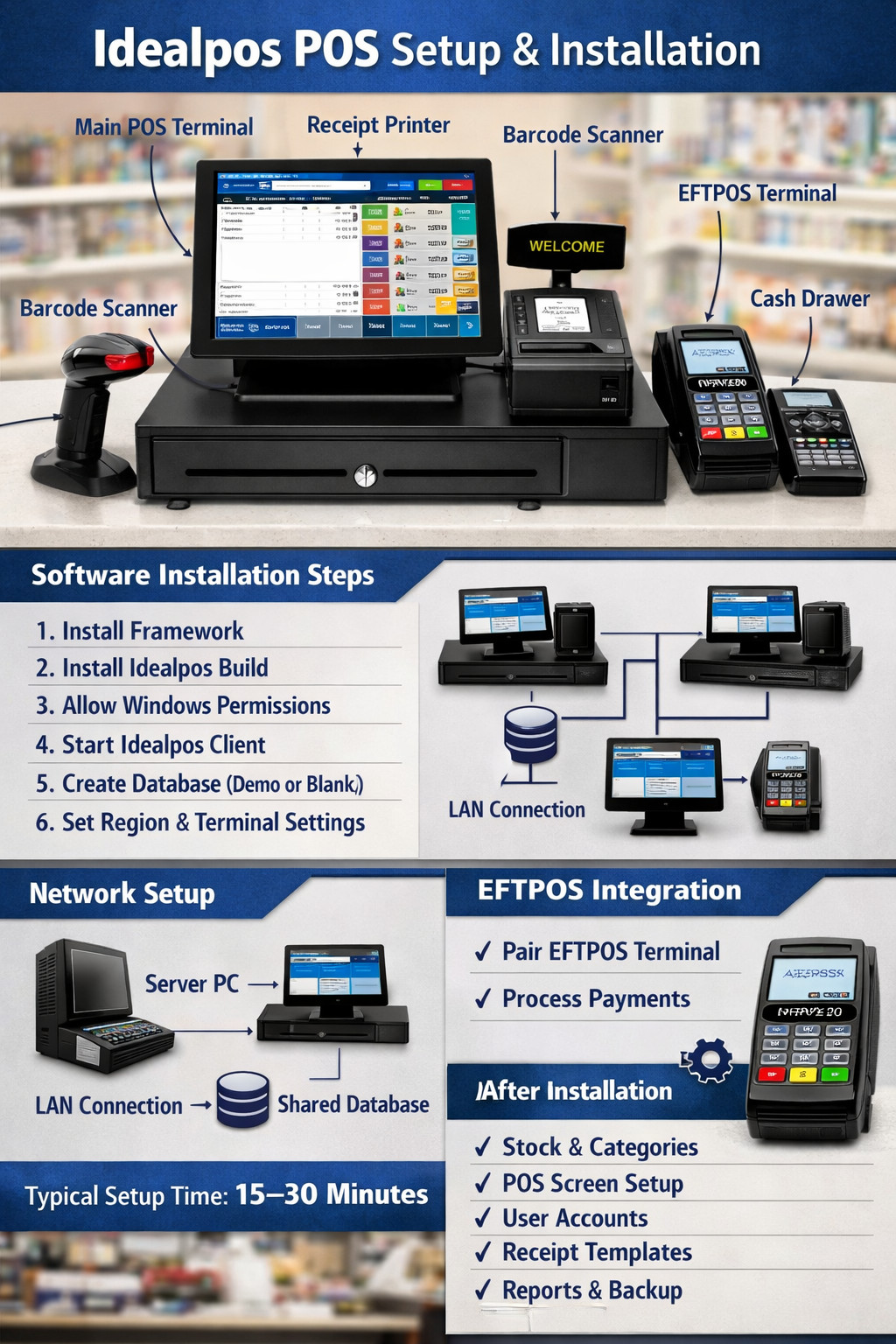
ACP Online provides professional Idealpos POS setup and installation for businesses looking for a reliable and efficient point-of-sale system.
Idealpos POS Setup by ACP Online
Point of Sale systems have become the backbone of modern retail and hospitality businesses. A reliable POS system helps manage sales, inventory, reporting, and customer transactions efficiently. This is why professional Idealpos POS Setup services are essential for businesses that want to get the most out of their POS investment while avoiding technical complications.
ACP Online provides expert POS solutions designed to help businesses streamline their operations. With extensive experience in POS deployment, their team ensures that every system is configured correctly to meet specific business requirements. From hardware installation to software configuration, their complete service approach ensures businesses can start operating smoothly from day one.
One of the main benefits of professional Idealpos POS Setup is proper system integration. A POS system often needs to connect with receipt printers, barcode scanners, cash drawers, and payment terminals. Without correct configuration, these components may not function properly together. ACP Online ensures all hardware components are installed and synchronized to deliver seamless performance.
Efficiency is another important advantage. A properly installed POS system helps staff process transactions faster, reducing queues and improving customer experience. With expert Idealpos POS Setup, businesses can minimize downtime and avoid common setup errors that may otherwise affect daily operations. This allows staff to focus on customer service instead of dealing with technical problems.
Customization is also critical when implementing a POS solution. Every business operates differently, and their POS system should reflect their workflow. ACP Online configures Idealpos systems according to business type, whether it is retail, hospitality, or service-based operations. Customized product categories, pricing structures, and reporting tools ensure the system supports business goals effectively.
Training is another valuable part of the setup process. Even the most advanced POS systems need proper user understanding to deliver maximum value. ACP Online provides basic operational guidance so staff can confidently manage transactions, refunds, and reports. This hands-on approach ensures businesses gain full value from their Idealpos POS Setup investment.
Security is also a priority for modern businesses. POS systems manage sensitive transaction data, and proper configuration is necessary to maintain secure operations. ACP Online follows industry best practices to ensure secure access controls and safe transaction processing. This helps businesses maintain compliance while protecting customer information.
Ongoing technical support further strengthens the value of professional services. Technology requires maintenance, updates, and occasional troubleshooting. ACP Online offers responsive support services to help businesses resolve technical issues quickly. Their continued assistance ensures that your Idealpos POS Setup continues to perform efficiently long after the initial installation.
Scalability is another important consideration. As businesses grow, their POS requirements may change. Additional terminals, software upgrades, or integration with new technologies may become necessary. ACP Online provides scalable solutions that allow businesses to expand their systems without major disruptions. This flexibility ensures the POS system remains a long-term asset.
Modern POS systems also provide valuable business insights. Reporting tools help track sales trends, inventory levels, and staff performance. With the right setup, business owners can make data-driven decisions that improve profitability. A well-planned Idealpos POS Setup ensures these reporting tools are properly configured and easy to use.
In conclusion, a professionally installed POS system is essential for businesses that want reliability, efficiency, and long-term performance. ACP Online delivers expert installation, customized configuration, and dependable support services to ensure every client receives maximum value. Investing in professional Idealpos POS Setup services helps businesses improve transaction efficiency, strengthen operational control, and enhance the overall customer experience.
The team supplies and configures the powerful Idealpos platform, helping retail stores, cafés, restaurants, and hospitality businesses manage sales, inventory, and reporting with ease. ACP Online ensures the POS system is fully installed and integrated with essential hardware including POS terminals, barcode scanners, receipt printers, cash drawers, and EFTPOS machines.
From initial consultation to system configuration and staff training, ACP Online delivers a complete setup so your business can start operating smoothly from day one. Their experts also provide ongoing technical support, upgrades, and troubleshooting to keep your POS system running efficiently.
Whether you’re launching a new business or upgrading your current system, ACP Online offers dependable
Idealpos POS solutions designed to improve speed, accuracy, and business management
Installing a Point of Sale (POS) system correctly is essential for smooth business operations in retail stores, supermarkets, cafés, and hospitality venues. Idealpos POS is a powerful and flexible POS software widely used in Australia and New Zealand because it integrates sales processing, stock management, reporting, and EFTPOS payments into one system. This guide explains the Idealpos POS setup and installation process in a clear and practical way.
Overview of Idealpos POS
Idealpos is designed to manage daily sales transactions efficiently while also providing business owners with detailed reporting and inventory control. It supports multiple terminals, integrates with barcode scanners, receipt printers, cash drawers, and EFTPOS devices, and allows businesses to manage staff and customers through a centralized database.
Before installing Idealpos, it is important to ensure that the required hardware and system environment are ready. A typical POS setup includes a POS computer or touchscreen terminal, barcode scanner, receipt printer, cash drawer, customer display, and EFTPOS terminal. All these devices work together to create a complete point-of-sale environment.
Hardware Setup
The first step in the installation process is connecting the hardware components. The POS computer acts as the main terminal where the Idealpos software is installed. Peripheral devices are then connected to the computer using USB, Ethernet, or serial connections.
The barcode scanner allows staff to quickly scan product barcodes during checkout. The receipt printer prints transaction receipts for customers, while the cash drawer automatically opens when cash payments are processed. Some stores also use a customer display screen that shows transaction details to customers in real time.
Ensuring that all hardware is correctly connected and recognized by the operating system is essential before moving on to the software installation.
Installing Idealpos Software
Once the hardware is ready, the Idealpos software installation can begin. The process usually starts with installing the Idealpos Framework, which contains the system components required for the software to run. After the framework installation is complete, the main Idealpos build file is executed.
During installation, Windows security prompts may appear, and these permissions should be accepted so the software can install correctly. After the installation finishes, the Idealpos Client is launched automatically.
At this stage, the user is prompted to create a database. Businesses can choose a demo database for training and testing purposes or create a blank database for a live business setup. The database stores all important information such as products, sales transactions, staff details, and reports.
Network Configuration
For businesses with multiple checkout counters, Idealpos supports a multi-terminal network setup. In this configuration, one computer functions as the server and stores the main database. Other POS terminals connect to this server through a local area network (LAN).
Each terminal runs the Idealpos client but shares the same database, allowing all sales and stock information to be synchronized across the system. Setting a static IP address for the server is often recommended to maintain stable connections between terminals.
EFTPOS Integration
Many businesses also integrate their EFTPOS payment terminals with Idealpos. This integration allows payment amounts to be automatically sent from the POS system to the EFTPOS terminal, reducing manual entry and minimizing errors.
To enable this feature, the EFTPOS provider must supply the required integration license or connection details. Once configured, the payment process becomes faster and more efficient for both staff and customers.
Final Configuration
After installation, several configuration steps must be completed to prepare the POS system for daily operations. These include creating product categories, entering stock items, setting up user accounts for staff, and customizing the POS screen layout.
Businesses can also configure receipt templates, payment types, and reporting options. Regular database backups should be enabled to protect important business data.
Conclusion
A proper Idealpos POS setup and installation ensures reliable sales processing, accurate inventory tracking, and efficient payment handling. By correctly installing hardware, configuring the software, and setting up network and payment integrations, businesses can create a robust POS system that supports smooth day-to-day operations and improves overall efficiency.
Some Usefull Resources on Idealpos Pos Setup