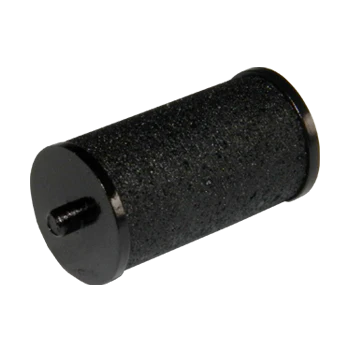
Ink Roll Meto 718/1522/2200 BLACK
The Meto 718/1522/2200 Black Ink Roller is a specialized replacement consumable designed for use in Meto hand-held price guns and labeling tools. These rollers are engineered to provide consistent, crisp impressions on labels without smudging or fading.
Product Specifications
-
Ink Color: Black
-
Compatibility: Specifically designed for the following Meto series:
-
ProLine S (e.g., 718, 722)
-
ProLine M (e.g., 1522)
-
ProLine L (e.g., 2200)
-
Standard/Eagle series models matching these numbering sequences.
-
-
Packaging: Usually sold individually or in packs of 5, sealed in airtight foil to prevent the ink from drying out before use.
Key Features
-
Quick-Drying: The ink is formulated to dry almost instantly upon contact with the label, preventing smears during high-speed labeling.
-
Consistent Flow: Designed to distribute ink evenly across the print head, ensuring every digit and character is legible.
-
Clean-Touch Design: Meto rollers are typically designed for “easy-change” systems, allowing you to replace the roller without getting ink on your fingers.
-
Longevity: Depending on the model and usage intensity, one roller typically lasts for several thousand impressions.
Maintenance Tips
-
Storage: Keep spare rollers in a cool, dark place. Once the foil seal is broken, the roller will begin to dry out naturally over time.
-
Replacement: If your price labels are appearing faint or “patchy,” it is time to replace the roller. Do not attempt to re-ink these rollers manually, as liquid ink can clog the delicate mechanical parts of the labeling gun.
-
Cleanliness: Periodically check the print head of your Meto gun for paper dust or old ink buildup to ensure the new roller performs optimally.
Replacing the ink roller in Meto ProLine and Eagle series guns (like the 718, 1522, and 2200) is designed to be a mess-free process.
Step-by-Step Replacement Guide
-
Open the Ink Chamber:
-
Squeeze the hand trigger firmly and hold it.
-
While holding the trigger, locate the front section of the gun (the ink roller holder).
-
Pull this front section away from the body of the gun until it clicks and locks into an open position. You can now release the trigger.
-
-
Remove the Old Roller:
-
The ink roller is held by a small grey plastic bracket.
-
Slide this grey bracket out from the holder.
-
To release the old roller from the bracket without touching the ink, squeeze the two ends of the bracket together; the old roller should drop out.
-
-
Prepare the New Roller:
-
Open the foil or blister pack of your new black ink roller.
-
Tip: You don’t need to take the roller out with your hands. Instead, push the empty grey bracket directly into the packaging and “click” it onto the ends of the new roller.
-
-
Reinstall:
-
Slide the grey bracket (now holding the new roller) back into the metal arms of the front section.
-
Push the entire front assembly back into the gun until it snaps shut.
-
-
Test:
-
Squeeze the handle a few times to ensure the ink is flowing properly and the digits are printing clearly on your labels.
-