Mobotix MX-Q25M-Sec-D12 in New Zealand
Explore Mobotix MX-Q25M-Sec-D12 from ACP Online New Zealand. This product is listed in our IP Cameras range for customers seeking dependable business and technology solutions.
Product information
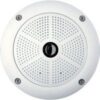
Hemispherical Dome camera for indoor and outdoor use with a resolution of QXGA. This camera unites modern design and innovative technology. Thus it is possible to view a complete room (360°) with only one camera.
An elegant, ultra compact and weatherproof IP dome camera. Thanks to the 360° allround view to capture an entire room, a panorama function and a quad view to show images from four different angles simultaneously, the Q25 can be used in all new scenarios.
High-resolution widescreen panorama from wall to wall, ideal for access control
Integrated DVR (up to 64 GB) for long-term recording without network load
Digital continuous tilting, panning and zooming without mechanically moving the camera
Robust and low maintenance with no moving parts
Newest MOBOTIX 5MP sensor technology with up to 30 fps and improved zoom
Microphone, speaker, MxBus and intelligent movement sensors (MxActivitySensor)
Optimized image quality and reduced motion blur even in poor lighting conditions
Lens: L12 (180° x 160°)
Sensitivity –
Color: 0.25 lux (t=1/60 s), 0.013 lux (t=1/1 s)
B/W: 0.05 lux (t=1/60 s), 0.0025 lux (t=1/1 s)
MxLEO – Lowlight Exposure Optimization
Sensor: 1/2.5" CMOS, 5 Megapixel, progressive scan
Max. image size:
Color + B/W: 2048 x 1536 (QXGA)
Image format:
Free image format selection (from 160 x 120 to 2048 x 1536);
PTZ view, Quad view, panorama broad view image, double panoramic view, panorama focus with 3 views
Max. frame rate (M-JPEG)
(Live/Recording):
VGA: 30 fps, MEGA/HD: 10 fps,QXGA: 4 fps
Max. Video stream (MxPEG)
(Live/Recording/Audio):
VGA: 30 fps, MEGA/HD: 30 fps, QXGA: 20 fps
Image compression:
MxPEG, M-JPEG, JPG, H.264 (SIP Video only)
Internal DVR:
MicroSD slot (camera internal video recording up to 64 GB; 4 GB card pre-installed)
External storage:
Directly on NAS and PC/Server without additional recording software
Software (free of charge):
Video-Management-Software MxEasy, Control room software MxControlCenter, MOBOTIX App for iOS devices from iOS 5.0
Image processing:
Backlight compensation, automatic white balance, image distortion correction (panoramic image correction included), motion detection, MxActivitySensor
Virtual PTZ:
Digital Pan/Tilt/Zoom, continuous 8x zoom, full image recording in the background
Alarm/Events:
Triggering of events by integrated multiple-window motion detection, external signal, temperature sensor, notification over email, FTP, IP-Telephony (VoIP, SIP), visual/acoustic alarm Pre- and post-alarm images
Audio:
Integrated microphone and speaker, lip-synchronous audio, two-way speaker, audio recording
Interfaces:
Ethernet 10/100, IPv4/IPv6, MiniUSB, MxBus, IO and RS232 via MX-232-IO-Box (accessory)
Video phone telephony:
VoIP, SIP, two-way speaker, remote control via DTMF signaling, event notification
Security:
User-/Group management, HTTPS/SSL, IP address filter, IEEE 802.1x, Intrusion Detection, digital image signature
Certificates:
EMV (EN50121-4, EN55022, EN55024, EN61000-6-2, FCC part15B, AS/NZS3548)
Power supply:
IEEE 802.3af Power over Ethernet (PoE injector not included), PoE class variable (2/3) according to operating mode; power consumption typ. 4.5 W
Operating conditions:
IP65 (DIN EN 60529), -30° bis +50 °C (-22°F to +122°F)
Dimensions:
Ø x H: 16 x 5 cm
Weight:
approx. 450 g
Product details
- Brand: Mobotix
- SKU / model reference: MX-Q25M-SEC-D12
- Product category: Security › CCTV-Cameras › IP Cameras
- Catalogue status: Send enquiry to confirm stock and current pricing.
Before ordering
Please confirm model, connection, sizing, consumable or device compatibility where applicable. Product images and references should be checked against your existing equipment before purchase.
ACP Online New Zealand support
ACP Online supplies business technology products and related solutions across New Zealand. For product matching, availability or ordering assistance, contact the ACP Online team.